Your phone becomes a pro microphone for your computer. Encrypted Wi-Fi or a
USB cable, a few milliseconds of latency. Windows and macOS see a real mic —
so every app does. Then it keeps going: voice effects, a soundboard, your game's
chat translated, synced multi-phone recording — all from the phone on your desk.
If your browser holds back the download ("not commonly downloaded"), open its downloads list, click … next to the file, then Keep. In Edge: Show more, then Keep anyway.
The installer is signed by App And Soft. While the signature is new, Windows may still show a warning: click More info, then Run anyway.
Phone and computer on the same network — or just a USB cable.
The iPhone app is out; the Android app is still in preparation. On the
privacy page, exactly what EZ Microphone does
with your voice.
Sound — Input device
EZ MicrophoneDEFAULT
Realtek Array Microphone
Webcam Microphone
14-day free trialNo accountNo cloudNo audio setup48 kHz Opus on the airWindows 10 / 11 (x64)macOS9 languages
How it works
Three steps. Then forget it exists.
01
Install both apps
The phone app, free for 14 days, then a subscription or a one-time purchase. And its companion for Windows or macOS. Two minutes, tops.
02
Scan the QR code
Point the phone at your computer screen. Pairing done — and your computer's identity is pinned for good.
03
Talk
A virtual microphone shows up on the computer. Pick it in Discord, OBS, Zoom, your game. The app then plays your voice back to you and tells you which app is listening — so you know it works before you go live.
Pricing
Everything, free for 14 days. Then it's your call: a year, or forever.
No tiers, no crippled version.
You get the whole thing on day one; when the trial ends it stops and says so. Two ways to
keep it, both through your store — nothing to enter, nothing to remember.
Trial
14 days, everything included
The virtual microphone, encrypted Wi-Fi & USB cable
All 20 voice effects and the voice designer
Soundboard, faders, game chat, recording — all of it
It's the first two weeks of the yearly plan: cancel before day 14 and you pay nothing
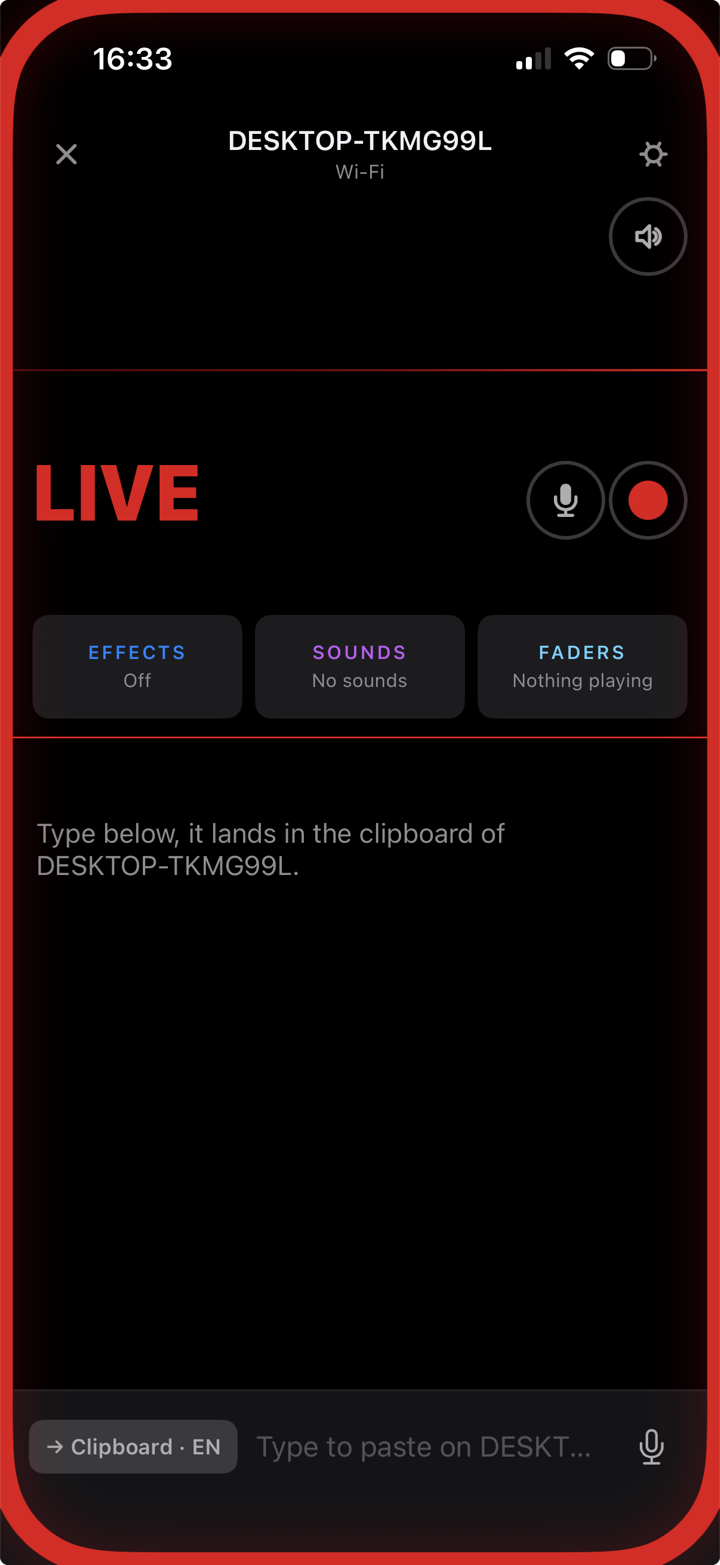
The phone lies flat on the desk while your eyes are on the monitor. So the
screen is built to be read from the corner of your eye: the frame changes colour with
your state, the wave is your voice — flat means muted, and you see since when.
Same screen on iPhone and Android.
Live — the frame is your state
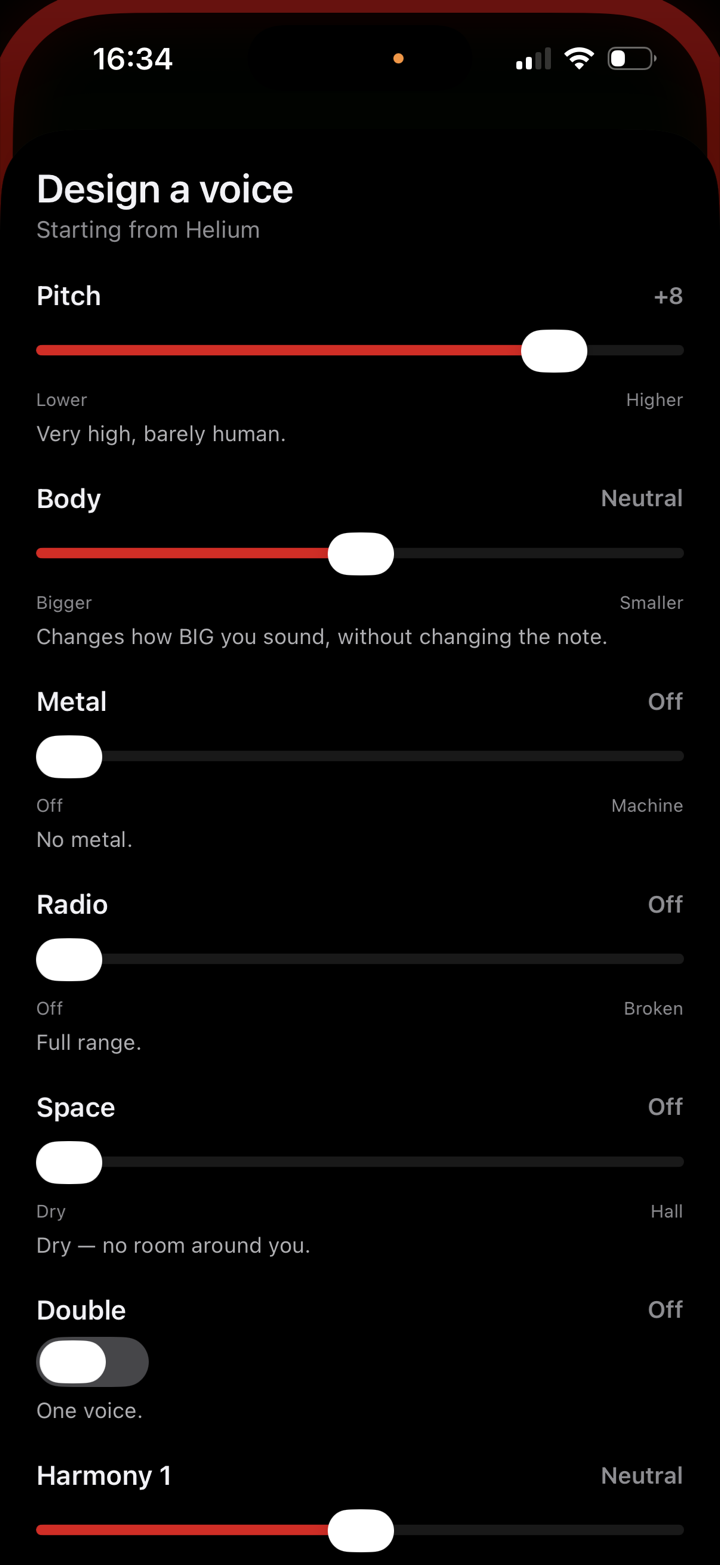
Effects — design a voice
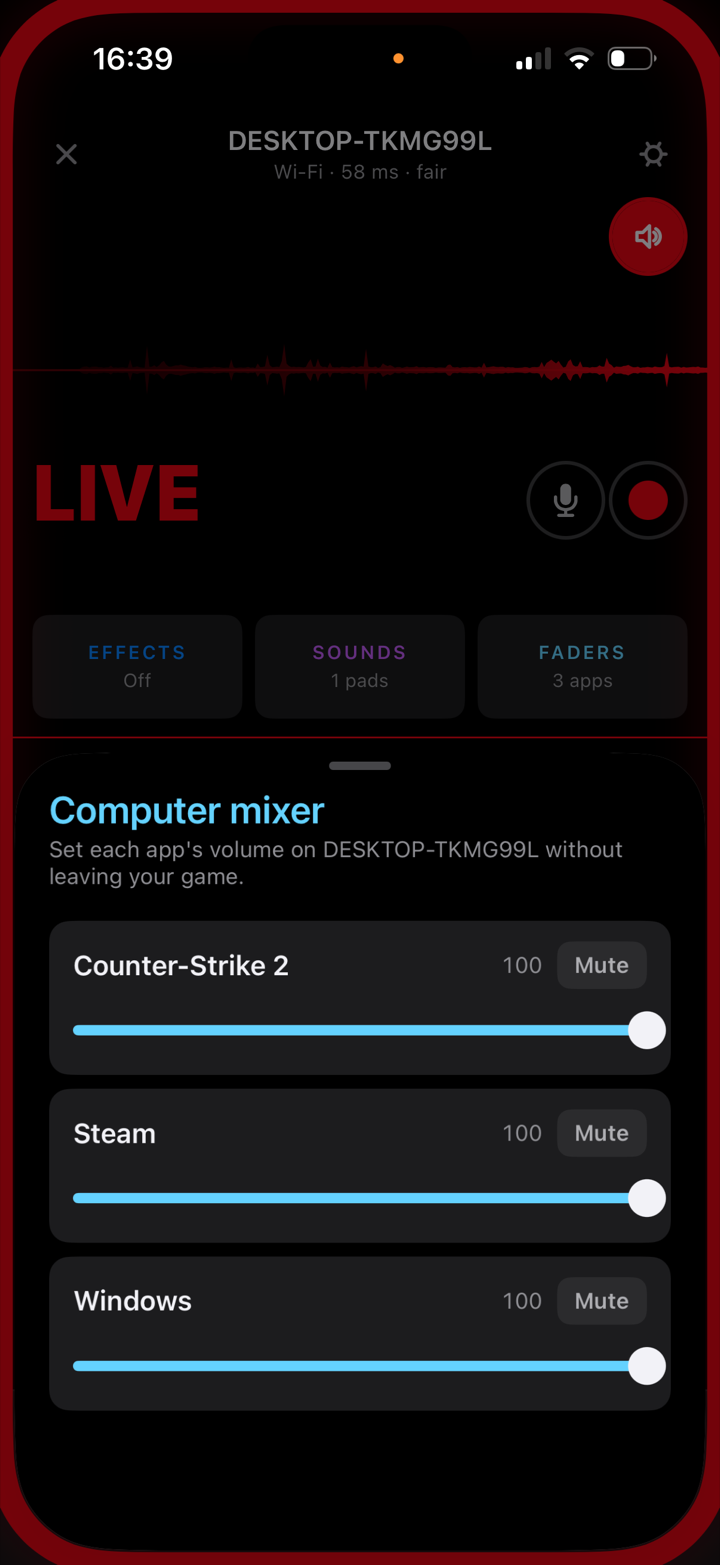
Faders — the PC mixer
Features
Everything a studio rack does. In your pocket.
Grouped by what you're doing. Every one of these is shipped, in the app today.
The microphone
What makes it a mic you can trust on air.
Wireless & USB
Wi-Fi or a cable, and it switches between them mid-session on its own. On Android the app walks you to the one setting the cable needs.
A real microphone
An audio driver on Windows, a Core Audio plug-in on macOS — not a browser trick. Every app sees it. Even games.
End-to-end encrypted
Over Wi-Fi: modern cryptography, your computer's key pinned by the QR you scanned. Over USB, your voice stays on the cable. Nothing goes through a cloud, ever.
Noise reduction
A neural network strips the fan, the keyboard, the street. Your voice stays.
A noise gate you can actually set
Eight seconds of your room under the slider: the floor is the flat band, your voice the peaks, the threshold a line between them. Green passes, grey is cut.
Guided mic check
Say something — the PC plays it back on its speakers. Then the app names which program is listening to EZ Mic. No more "can you hear me?"
Mic delay, your call
30, 50 or 120 ms of buffer. Tight for a game, generous for a shaky Wi-Fi. The live figure is on screen while you talk.
Meeting mode & mute
Echo-cancelled voice for calls, mute synced both ways between phone and computer — and a buzz on the phone if you talk while muted.
Your voice
Shaped on the phone itself — so it works even without a computer.
20 voice effects
Autotune, hardtune, harmonizer, robot, Dark Lord and 15 more. Processed on the phone, in a few microseconds per block.
Design your own voice
Every effect opens into its real controls — pitch, body, space, harmony. Shape it live in your headphones, name it, keep it.
Studio monitor
Hear yourself back in the phone's headphones, effects included, over Wi-Fi or the USB cable. Like a booth.
Studio tone
Three-band EQ and a compressor, four ready-made timbres.
For streamers & gamers
Never alt-tab out of the match. The phone is already on the desk.
Soundboard on the phone
Up to 99 pads, your own MP3 / WAV / M4A, trimmed with two handles like a voice memo. Fires even while you're muted. Drop files in the PC's library and pick them from the phone.
Clip the PC
Your friend is on a roll. Tap to record what the PC is playing, tap again to keep it: up to thirty seconds become a pad.
FadersWINDOWS
One slider per PC application — Spotify, Discord, the game — on the phone. Music too loud mid-round? Fixed without leaving the match.
Game chat, translated
Counter-Strike 2 writes its chat to a log. The phone reads it, translates it on device, and shows it under your wave — with the round number. Tap a line to reply in their language.
Match alertsWINDOWS
Out for a smoke, the match starts — the phone in your pocket buzzes. Official game hooks only (CS2, Dota 2, League of Legends). No overlay, no memory reading, nothing that gets you banned.
Take the PC sound with youWINDOWS
Grab a drink between rounds and keep hearing the lobby in the phone. Answer "coming" from the kitchen. Works without earphones — echo is cancelled.
Game out of the micWINDOWS
Playing on speakers? EZ Mic hears what the PC plays and what the phone picks up, and pulls the game out of your voice channel. Measured: 17 dB of echo gone, your voice untouched.
Broadcast everywhere
AirPlay speakers — Apple TV included, paired with the on-screen code — and the PC's own outputs, at the same time as the virtual mic. Fill the room.
Words, not just voice
Sometimes you can't talk. Sometimes they don't speak your language.
Dictate to the PC's clipboard
Hold, say the phrase, release — it's ready for Ctrl+V on the computer, translated if you asked. Recognition and translation happen on the phone.
Type instead
Someone's asleep, or you don't know how to pronounce it. Type it — same destination, same translation, on every phone.
Talk to your team in their languageWINDOWS
You speak French; a voice says it in English straight into the game's voice chat. Your squad hears a teammate, not a translator.
Read the PC's clipboard
Copy something on the computer, read it on the phone — translated if it isn't in your language. On request only, never watched.
Recording
Several phones, one file, every voice on its own track — and in time.
Multitrack WAV
Mono, stereo, LCR, surround 4.0 — or one track per phone, edited apart afterwards.
Aligned within 2 ms
Each phone timestamps its capture; the computer places every track at the instant it was recorded, not the instant it arrived. Wi-Fi or cable, no drift.
The clapper
Before a multi-phone take, the PC plays a click through its speakers and measures each phone against it. If something's off, the phone that pressed REC decides: align, record as is, or cancel.
The master decides
Two phones or more, and REC opens a sheet on the one that pressed it: who's in the take, and on which channel. Left / Right for two, named tracks beyond.
The take, on your phone too
At STOP, the master is offered the file: keep it on the computer, or pull a copy to the phone — Files on iPhone, Music on Android.
Where it lands
A 48 kHz WAV in Documents › EZMic Recordings on the computer, one file per take, dropouts kept as silence rather than drift. Opens in any editor.
On the Mac
What the Mac's own engines make possible.
Live captionsMAC
On-device speech recognition writes what you say as you say it — corrected word by word, settled sentence by sentence. Pick the accuracy tier you want.
BabelMAC
Your captions, translated live and spoken into the virtual mic in the other language, your own voice ducked underneath. An interpreter, one sentence behind.
The Mac as a mic too
A menu-bar app that turns a Mac into a source for the PC — same encryption, same Opus, same everything.
Both apps speakEnglishFrançaisDeutschEspañolItalianoPortuguêsРусский日本語한국어
The voice designer
Make a voice nobody else has.
Every effect opens into its own controls — only
the ones that matter for that sound. Slide, and you hear it change live in your
headphones. When it's yours, name it and keep it.
Design a voice — starting from Deep
Pitch-4
Body+2
Space40
MetalOff
Game chat — translated on the phone
— ROUND 7 —
[T] КрасныйМедведьпошли на базу, у них нет денегLet's go to base, they have no money · translated from Russian
[CT] Felixgg wp
Reply › in Russian
Game chat
Read the chat you can't copy.
A game's chat is an image on screen — you can't
select it, let alone translate it. EZ Mic reads the log the game writes for itself,
and the phone translates it on device, name untouched. Tap a line and answer in the
other person's language — typed, or straight into the game's voice chat.
Live captions · Mac
Your words, as you say them.
Flip one switch on the phone and the Mac writes
what it hears — corrected word by word, settled sentence by sentence. Recognition runs
entirely on the computer: no cloud, no account, nothing leaves the room. Add a target
language and Babel speaks the translation into the mic.
Live captions — on this Mac, on device
Latency
single-digit milliseconds
Fast enough that your own
voice in the monitor doesn't feel like an echo. The app shows the live figure while you
talk — no guessing, no faith required.
EZ Microphone, USB~3 ms
EZ Microphone, Wi-Fi~8 ms
Bluetooth headset~200 ms
Waiting for someone to finish on a bad callforever
Use cases
Pick your room.
Streaming
Soundboard, voice effects and the clip of the night, one thumb away on the phone in your hand. Never touch the PC.
Gaming
Mic, faders and the chat translated without alt-tabbing out of the match. Your squad hears you, not your keyboard.
Podcast
One phone per guest, one track per voice, aligned within two milliseconds. Edit them apart afterwards.
Meetings
Meeting mode, and mute synced both ways between computer and phone.
FAQ
Short answers.
Which apps does it work with?
All of them. It's a genuine microphone as far as your computer is concerned, so anything that can pick a mic can pick this one — Discord, OBS, Zoom, Teams, games, recorders.
Windows or Mac?
Both. The companion runs on Windows 10/11 (64-bit x64 — not Windows on ARM, the audio driver does not exist for it) and on Apple Silicon Macs (M1 and later — not Intel). The phone can be an iPhone or an Android. A few features live on one side only and are marked so above: faders, match alerts and the PC-sound features are Windows; live captions and Babel are Mac.
Does it need the internet?
Not for your voice: the phone and the computer just need to be on the same local network — home Wi-Fi, a hotspot, anything — or a USB cable, and your voice never goes through a cloud. The phone does connect to our server now and then to confirm your purchase; without the internet it keeps working for at least a week. Translation packs are downloaded once, then everything runs on the phone.
What if the Wi-Fi drops?
It reconnects by itself, and it will fall over to USB if the cable is in — and back. You keep talking.
The USB cable does nothing on my Android?
Android needs USB tethering switched on for the cable to carry data, and no app is allowed to switch it on for you. The app shows an amber line the moment it sees the cable — tap it, flip the switch, done. iPhone needs nothing.
How many phones at once?
As many as you like — one fader each on the computer, one track each in a recording. The phone that presses REC chooses who's in and on which channel.
What about my battery?
Tuned for long sessions, and it runs as a foreground service so the system never quietly kills it. Plug in for a marathon stream — the cable then carries the audio too.
And privacy?
Over Wi-Fi, end-to-end encrypted with modern cryptography (X25519, ChaCha20-Poly1305), your computer's key pinned by the QR you scanned. Over a USB cable, your voice stays on the cable. No cloud, no account, no analytics of ours. Speech recognition and translation run on the phone or the Mac. The privacy page says exactly what the code does.
What's under the hood?
Opus at 48 kHz over RTP on the network; a virtual audio driver on Windows and a Core Audio plug-in on macOS; a neural network for denoising; on-device Whisper for captions on the Mac; a phase vocoder on the phone for the voices. You'll never need to know that again.
On the App Store — Android coming soon
Stop shopping for a microphone.
It's in your pocket. It's already good. Plug it in.
If your browser holds back the download ("not commonly downloaded"), open its downloads list, click … next to the file, then Keep. In Edge: Show more, then Keep anyway.
The installer is signed by App And Soft. While the signature is new, Windows may still show a warning: click More info, then Run anyway.
The Android app is still in preparation. Write to contact@ezmicrophone.com if you want to hear about it. Windows: 64-bit x64 only — the virtual audio driver does not exist for Windows on ARM. macOS: Apple Silicon (M1 and later), not Intel.